


Best HVAC apps for technicians (That you'll actually use every day)
A no-fluff guide to the HVAC apps that actually get used in the field – what each one does, who it's for, and whether it's worth downloading.


Your phone is already on every job. The question is whether it's working for you or against you.
The right apps can cut callbacks, kill paperwork, and get you paid faster. The wrong ones – or the wrong combination – add friction to a day that already has too much of it. This guide cuts through the noise: five categories, the best options in each, and honest notes on who each one is actually for.
The five categories we cover:
- Field service management (scheduling, invoicing, CRM)
- Diagnostics and troubleshooting
- Refrigerant calculators and reference
- Job documentation
- Training and continuing education
This is written for HVAC technicians and small HVAC business owners running crews of one to ten people – not enterprise operations with 200 techs, different budgets, and different problems. If you're running calls yourself or managing a small crew, keep reading.
How we picked these: features, real-world usefulness in the field, contractor forums, user reviews, and fit for small HVAC businesses.
Tofu in 30 seconds. Tofu is field service software for contractors and crews up to 10: scheduling, jobs, invoices, estimates, CRM. Plans start at $29/mo ($15/mo billed annually), it runs on iOS and Web, and the 7-day free trial needs a card on file but charges nothing upfront. Start a free trial.
“Tofu turns estimates into invoices and instantly syncs jobs, photos, and client notes offline. Having a web dashboard and a team app for crew coordination is very beneficial.” Verified user, G2
HVAC field service management apps
Field service management software ties together dispatch, scheduling, invoicing, and customer records into one workflow. Without it, jobs get lost in texts, invoices slip through the cracks, and callbacks pile up. There's no shortage of options – from full-blown enterprise platforms to lightweight tools built for small crews. Here are the best at each level.
Tofu – Best for small HVAC crews

Tofu Field Service handles the admin side of HVAC work – scheduling, estimates, invoices, payments, and customer records. You get a worker app for the field (iOS and Android) and a separate owner app to manage the bigger picture.
In practice: you open the app, see your jobs for the day, update statuses, attach photos, and send an invoice before you leave the driveway. Offline mode keeps things running when there's no signal, syncs when you're back.
Platform: Web, iOS (owner), iOS / Android (worker) | Price: from $29/month, or $15/month billed annually
What users say:
“I've been using it for 2 years easy, simple and straightforward. Connect well with your phone able to interact with Customer data.” – David H., handyman, Capterra, May 19, 2026
“We absolutely love the app and what it does for our business. My only complaint would be that it can't be linked to multiple devices in the same account so that more than one of my employees can access” – Katherine Bryson, Trustpilot, Feb 11, 2026
Tired of paperwork after a long day of calls?
Tofu handles estimates, invoices, and payments from your phone – so you can close out jobs in the driveway and actually get home on time.
ServiceTitan – Best for larger HVAC operations

ServiceTitan is the benchmark for large HVAC operations – scheduling, dispatch, CRM, flat-rate pricebook, invoicing, and service agreements are all there and deeply integrated. If you're running 15 or more technicians and need enterprise-grade reporting and structure, it's the right tool.
The honest caveat: pricing is opaque (you go through sales), and the per-technician cost model only makes economic sense when you're spreading it across a lot of jobs. For a solo contractor or a two-person crew trying to stay profitable, ServiceTitan is a lot of money for a lot of features you'll never touch.
Platform: iOS, Android | Price: Custom (per-technician, pricing via sales)
What users say:
“Service Titan is worth every dollar, its reporting has real value. My schedule is clean, the invoices and estimates keep the workflow smooth.” – James C., Capterra, Mar 4, 2026
“It gets exhausting to have to take a picture 3 times before it will take. Always have to rewrite notes. The forms will randomly close” – Bill Carroll, Trustpilot, Jul 30, 2026
Jobber – For growing HVAC contractors

Jobber sits in the middle of the market – a clean, well-built platform for contractors with 3 to 15 technicians. Quoting, scheduling, service agreements, and client management are all solid. It's more expensive than Tofu for small teams and doesn't have HVAC-specific depth, but if you're scaling past solo work and not yet ready for ServiceTitan pricing, Jobber bridges that gap well.
Platform: iOS, Android | Price: Starts ~$49/month
What users say:
“What I liked most about Jobber is how it gives us one central system to run the day-to-day operations of our plumbing and HVAC business.” – Richwell A., plumbing and HVAC, Capterra, Mar 15, 2026
“Specifically, when taking notes, capturing images, or filling out forms, I have lost a lot of time when they won't upload or sync successfully.” – Charles W., HVAC, Capterra, Feb 24, 2026
Best HVAC diagnostic and troubleshooting apps
On-site, you don't have time to flip through paper manuals or wait on hold for tech support. These apps put pressure-temperature data, charge calculations, and troubleshooting guidance on your phone, so you can diagnose faster and walk away with fewer callbacks.
Bluon HVAC – Best for on-demand technical support

Bluon covers over 200 HVAC brands, more than 500,000 equipment models (most with manuals), and a parts database of five million SKUs. The AI "Master Mechanic" tool is trained on more than 50,000 real problem-solution sets and claims 99% diagnostic accuracy – which is useful when you're staring at a unit that's throwing you off.
Where Bluon really earns its place is the live support line. It's staffed by experienced HVAC techs, not a chatbot. When the AI and the manual aren't cutting it mid-job, that's the kind of backup you actually want. For technicians who regularly work on unfamiliar equipment or need refrigerant data fast, Bluon belongs on your phone.
Platform: iOS, Android | Price: Free (core features)
What users say:
“Anytime I bump into an issue on the field that’s throwing me for a loop, or I am not sure about warranty, this is my go-to application for all my professional needs.” – LeftieLeon, HVAC, App Store, Jul 8, 2026
“Ridiculously expensive $99/mo per tech. With 30 years of real world experience, this app brings very little value to me at that price point” – Beauuuui, HVAC, App Store, Mar 14, 2026
MeasureQuick – Best for system performance testing and documentation
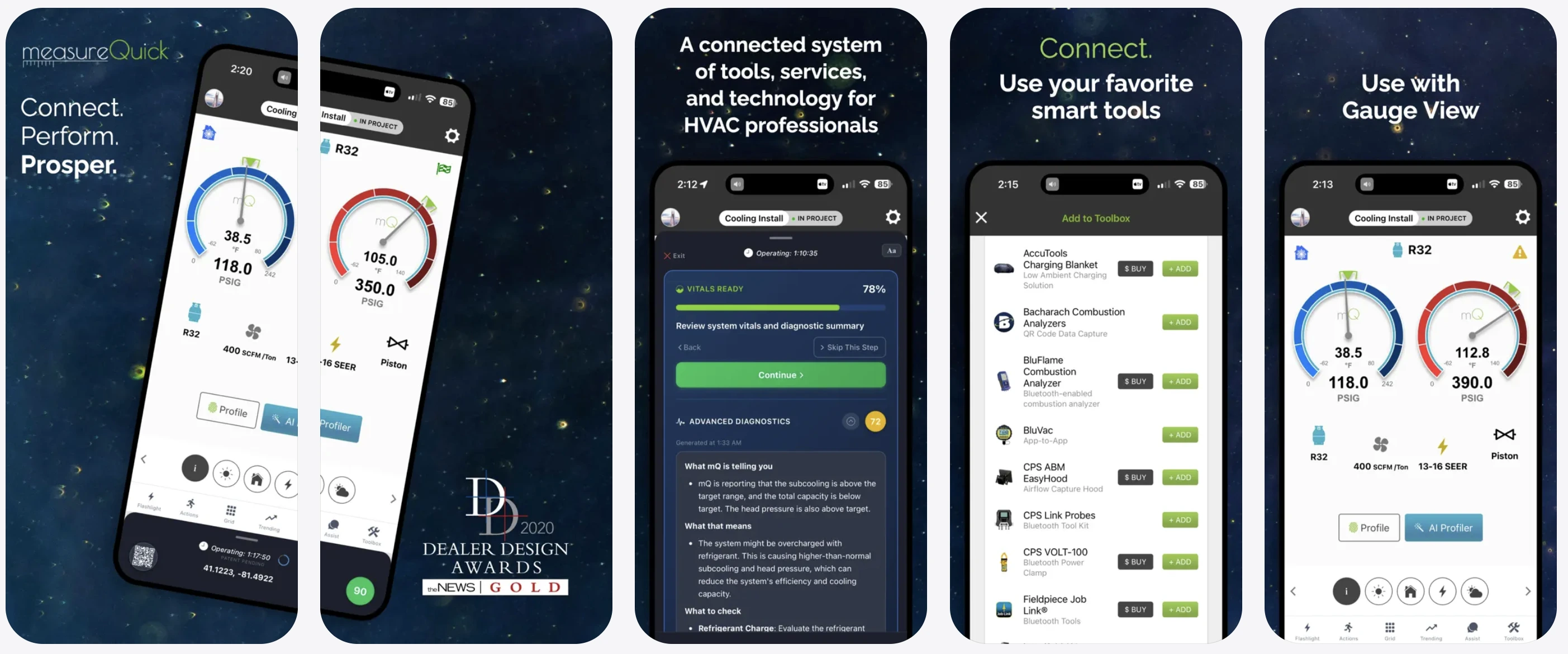
MeasureQuick connects directly to digital probes and tools – Testo, Fieldpiece, JB Industries, and others – to pull real-time pressures, temperatures, and airflow data. It's not a reference chart; it's a live diagnostic platform that shows you what the system is actually doing right now, flags anomalies automatically, and generates a report you can hand to a homeowner on the spot.
Contractor forums consistently rank MeasureQuick as the preferred diagnostic software, even among techs who use Fieldpiece hardware – because the native Fieldpiece app is widely considered clunky compared to what MeasureQuick does with the same probe data. If you invest in wireless tools, pair them with MeasureQuick.
Platform: iOS, Android | Price: Free tier available; paid plans for advanced features ($49/user/month)
What users say:
“I use it on every call and it makes a huge difference in time and accuracy. Having the type of data displayed in such a communicable way is a very powerful in the home” – Joe3b, HVAC, App Store, Aug 2, 2024
“You have to be signed in to use and is a PITA when you show up to a job with no service.” – Nicknamed122747, HVAC, App Store, Mar 19, 2026
Best HVAC refrigerant calculator and reference apps
These apps handle the quick reference and calculation work that doesn't fit into a full diagnostic platform – replacing physical P/T charts and cutting lookup time on the job.
Ref Tools – Best refrigerant reference app

Ref Tools covers 80+ refrigerants with a slider interface – including natural refrigerants – and shows pressure-temperature data, glide, and environmental impact side-by-side. When you're working on a system running an unfamiliar refrigerant blend, having that data instantly beats digging through a manual.
The standout feature for modern systems is the low-GWP retrofit tool, which matches climate-friendly refrigerant alternatives to specific systems with TXV compatibility and lets you toggle between IPCC AR4 and AR5 values. For technicians who work across many refrigerant types, this one's worth having in your back pocket.
Platform: iOS, Android | Price: Free
What users say:
“it takes away the hassle of having to either carry around a P/T chart or look up each refrigerant individually which makes jobs a lot easier.” – Dawur, HVAC/R, App Store, Oct 10, 2019
“Since the recent release, when I open the app, it immediately shuts off. No longer usable. Is it because it now requires most recent iOS?” – pelliper, App Store, Nov 9, 2024
Copeland Mobile – Best free charge calculator

Copeland (formerly Emerson) has consolidated its tools into the Copeland Mobile app, which now includes the Check & Charge calculator that techs have relied on for years. It covers R-22, R-410A, R-32, R-407C, R-134a, R-452B, R-454B, R-438A, and more – with subcooling, superheat, and airflow calculators where you enter system temperatures and latent environmental loads to get the correct charge target. The app also adds compressor specs, wiring diagrams, serial number lookup, and AI-assisted troubleshooting on top.
It's been a staple on technicians' phones for years for a simple reason: it works, it's free, and it loads fast. For quick charge verification in the field, this is the obvious starting point.
Platform: iOS, Android | Price: Free
What users say:
“The Copeland is daily improving and is such a wealth of knowledge at your fingertips. Part numbers, performance and troubleshooting. The new AI features are awesome!” – J65Bridge, HVAC, App Store, Apr 29, 2025
“now everything has extra steps, the layout is probably great for an engineer or someone sitting at a desk but it's absolutely terrible for a technician in the field.” – Freya Hassenmayer, HVAC, Google Play, Sep 2, 2026
Best HVAC job documentation app
CompanyCam – Best for photo and video documentation

CompanyCam is a field documentation platform that's become a go-to for HVAC contractors who need to document installs, repairs, and equipment conditions with photos and video – and get that documentation in front of the office and the customer fast. Every photo is automatically tagged with GPS location, time stamp, and job number. No more hunting through your camera roll to figure out which job a photo belonged to.
Where it earns its place in the HVAC workflow: before-and-after equipment photos, duct condition documentation, anything you'd otherwise be texting to the office from your camera roll. CompanyCam organizes it all by job and makes it shareable in one tap. For contractors who've had disputes about what the equipment looked like before they touched it, this kind of documentation is protection as much as it is professionalism.
Platform: iOS, Android | Price: Starts ~$19/month per user; free trial available
What users say:
“It frees up storage on my phone and allows me to share countless images all at once.” – Vincent Adams, contractor, Trustpilot, Aug 16, 2025
“Merging jobs can be tricky sometimes because you lose notes and random communication on the job profiles.” – Megan T., construction, Capterra, Apr 3, 2025
Best HVAC training apps
HVAC School – Best for continuous learning

HVAC School is free and gives you access to articles written by industry professionals, podcast episodes covering everything from fundamentals to advanced diagnostics, and crash courses across basic and advanced topics.
The podcast format is what makes it practical. You can use the commute between jobs to stay current on refrigerant transitions, code changes, or diagnostic techniques – without sitting down and reading. Useful for newer techs building their foundation and experienced techs who want to stay sharp.
Platform: iOS, Android | Price: Free
What users say:
“I’ve been listening to these guys podcast for years I can’t tell you how many times theses guys taught me something I never knew I didn’t know.” – Ra'Zoo, HVAC, App Store, Jan 27, 2026
“Great info for learning, but the app is not user friendly. I also had to delete the app and reinstall it because it wouldn’t show any new podcasts for the past 6 months.” – Goodgamebefghbfd, App Store, Nov 16, 2019
How to choose the right HVAC apps for your business
Start with crew size. Solo or one-to-three people? A lightweight FSM like Tofu will cost less, get used more, and cause you less frustration than any enterprise platform. Growing toward 10+ techs with structured dispatch needs? That's when Jobber or ServiceTitan start making sense. Using the wrong software for your stage costs you real money – either you're paying for features you never use, or you've outgrown what you have.
Don't try to find one app that does everything. Most working HVAC techs need both a field service tool and a technical reference app, because they solve different problems. Your FSM handles the business side. Your diagnostic apps handle the technical side. Trying to find one app to cover both usually ends with something that does neither well.
Check for offline functionality before you commit. On a job site in a building basement or rural area, you may not have a signal when you need the app most. Offline capability isn't a bonus feature – for field work, it's a requirement. Verify it before you build your workflow around any tool.
On cost: the best HVAC software for most small crews isn't the most expensive. Free diagnostic tools like HVAC Buddy, Copeland Mobile, and Ref Tools, combined with one affordable FSM subscription, cover 90% of what most small businesses actually need. Pay for what you use. Don't pay enterprise pricing for features you'll never touch.
HVAC paperwork shouldn't follow you home
Tofu handles the admin – jobs, invoices, payments – so you can wrap up after the last call and be done.




