


Jobber vs Housecall Pro: Which one is actually worth it?
Both are solid. Both have real tradeoffs. This comparison cuts through the pricing pages and tells you which one actually fits your crew in 2026.



Here's the short version: Jobber is cheaper for solo operators and small teams, has route optimization built in, and is easier to get started with. Housecall Pro is worth the higher price if two-way QuickBooks sync and built-in marketing automation are core to how your business runs.
Both are solid platforms for home service businesses. But neither is cheap once you hit a team of five, and both have add-on costs that make the real price harder to read than the pricing page suggests. If you're a 1–5 person crew who mainly needs fast invoicing and field payments, there's a third option worth knowing about. We'll get there.
Quick verdict
| Category | Jobber | Housecall Pro | Winner |
|---|---|---|---|
| Pricing (solo, annual) | From $19/mo | From $59/mo | Jobber |
| Pricing (5-person team, annual) | $97/mo | $149/mo | Jobber |
| Scheduling & dispatching | Strong | Strong | Tie |
| Invoicing & payments | Strong | Strong | Tie |
| Mobile app | Reliable | Good, more bugs | Jobber |
| Offline mode | ❌ | ❌ | Neither |
| QuickBooks sync | One-way (Connect+) | Two-way (Essentials+) | Housecall Pro |
| Marketing automation | Grow plan only | Essentials+ | Housecall Pro |
| Route optimization | ✅ Yes | ❌ No | Jobber |
| Time tracking | ✅ Yes | Limited | Jobber |
| Google Calendar sync | ✅ Yes | ✅ Yes | Tie |
| Customer support | Phone, chat, email | Chat + scheduled calls | Jobber |
| Free trial | 14 days, no card | 14 days (MAX only), no card | Tie |
Tofu in 30 seconds. Tofu is field service software for contractors and crews up to 10: scheduling, jobs, invoices, estimates, CRM. Plans start at $29/mo ($15/mo billed annually), it runs on iOS and Web, and the 7-day free trial needs a card on file but charges nothing upfront. Start a free trial.
“It’s the only platform I found with everything in one place.” Ricardo S., Trustpilot
What is Jobber?
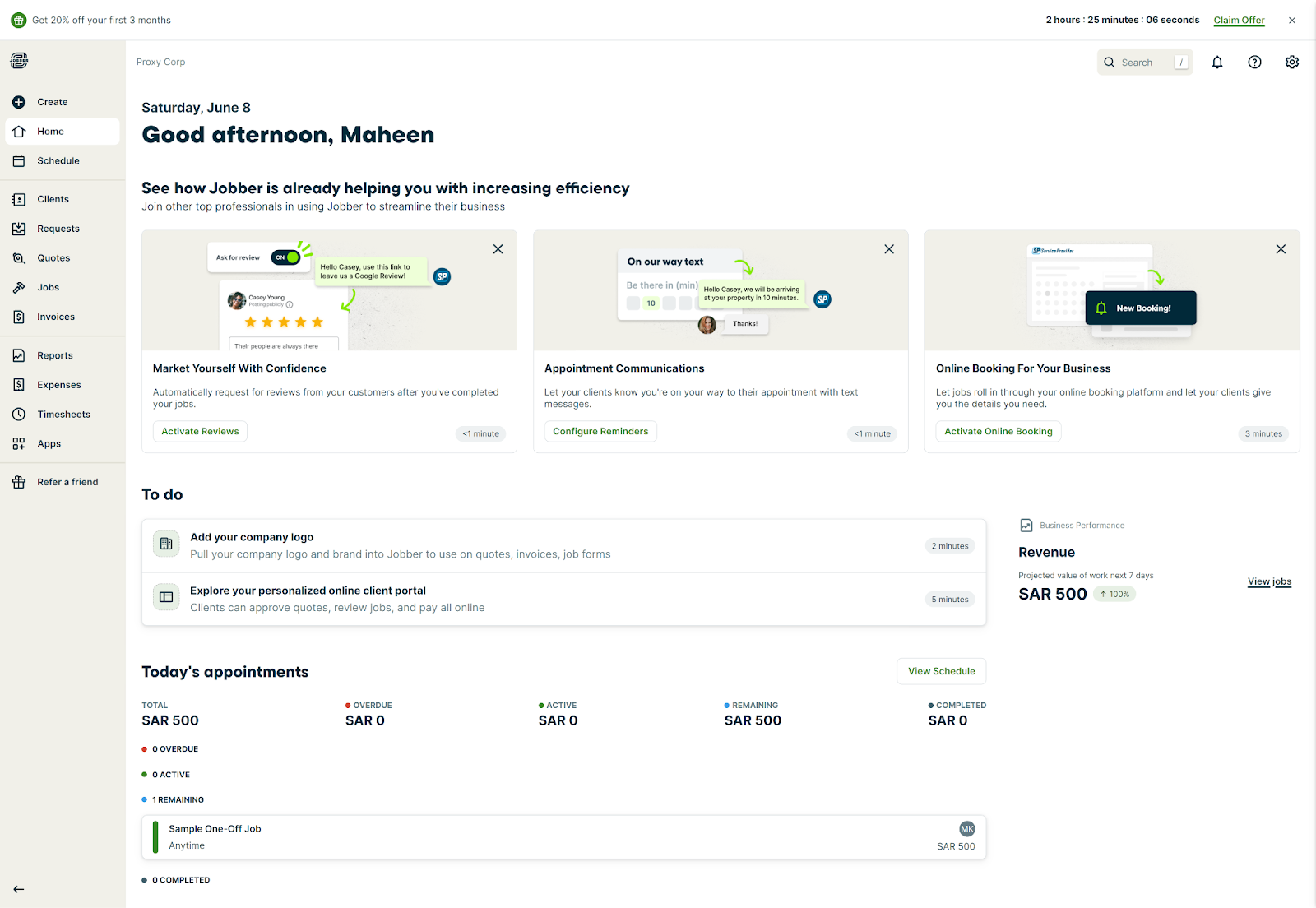
Jobber is field service management software for home service businesses – HVAC, landscaping, plumbing, electrical, cleaning, painting, roofing. It launched in 2011 and now serves over 300,000 users. Most reviews point to the same strengths: fast onboarding, clean scheduling, and invoicing that actually works from your phone.
The platform covers the full operation – quoting, scheduling, dispatching, invoicing, payments, and customer management. Quotes auto-convert to jobs when approved. Route optimization was added in 2025 and is now included on Connect and above. Time tracking is available across most plans.
The main weaknesses: no offline mode, per-user pricing adds up fast beyond the included users on each plan, and two-way QuickBooks sync isn't available at any plan level – Jobber's integration is one-way.
What is Housecall Pro?
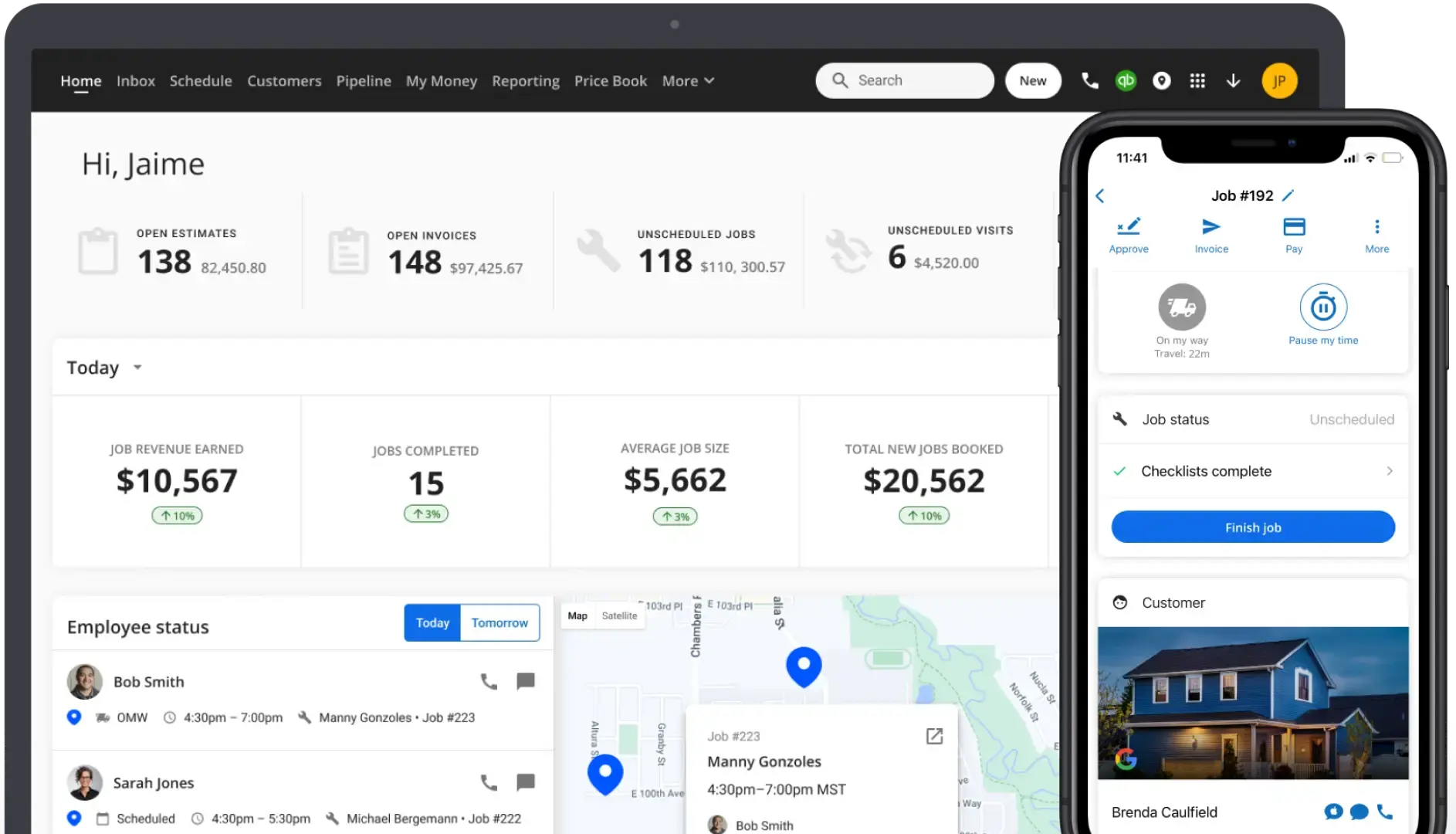
Housecall Pro is field service management software that launched in 2013 and serves home service businesses across HVAC, plumbing, electrical, landscaping, cleaning, painting, roofing, and handyman. Its main differentiators are two-way QuickBooks sync (including Desktop support) and built-in marketing automation – both available from the Essentials plan.
The platform handles scheduling, GPS dispatch, invoicing, payments, and customer communication. Customers can book and pay online directly from Google or your website. Automated post-job review requests and email campaigns are included on Essentials without third-party tools.
The downsides are real: the Basic plan is genuinely too limited for most businesses – no QuickBooks, no GPS dispatch – which means most teams end up at $149/month minimum. Add-ons like the Price Book ($149/mo) and Vehicle GPS ($20/vehicle/mo) push real costs well past the plan price. And there's no route optimization at any tier.
Running a crew of 1–5? There's a simpler option.
Tofu is built for solo pros and small trade crews who need the core of FSM – jobs, scheduling, estimates, invoicing, and payments – without paying for the enterprise stack on top.
Feature comparison
Scheduling & job management
Both platforms have drag-and-drop calendars, recurring job support, Google Calendar sync, and a mobile app for updating job status in the field.
Where they split: Jobber includes route optimization on Connect and above – you can auto-sequence a full day of stops. Housecall Pro has no route optimization at any price point. If your team runs multiple stops daily and currently plans routes manually, that's a meaningful operational gap.
Housecall Pro's GPS dispatch updates technician locations on the map, but based on user reviews the refresh rate is every few minutes, not real-time. Neither platform handles multi-phase construction timelines – both are built for service calls, not project management.
Invoicing & payments
Both let you create invoices, send them by text or email, collect payment on-site or online, and process credit cards at roughly 2.9% + $0.30 per transaction. Both support ACH payments (Jobber at 1%, Housecall Pro at 1%). Both allow fee passthrough to clients.
Jobber's quote-to-job-to-invoice flow has no manual steps once a quote is approved. Housecall Pro handles deposit collection and partial payments more cleanly out of the box. For same-day payment after a service call, both work fine from a phone.
Batch invoicing and recurring invoices are available on Jobber's Connect plan and above. On Housecall Pro, they're included on Essentials.
QuickBooks integration
This is the clearest functional gap between the two platforms. Housecall Pro supports two-way QuickBooks sync on Essentials and above, including QuickBooks Desktop. Changes made in either system reflect in both. Jobber integrates with QuickBooks Online on Connect and above, but the sync is one-directional.
If your bookkeeper works directly in QuickBooks and you need changes to flow both ways without manual reconciliation, Housecall Pro has the better integration. If you're on QuickBooks Desktop specifically, Jobber doesn't support it at all.
Marketing automation
Housecall Pro includes automated post-job review requests, email campaigns, and customer follow-up tools on the Essentials plan. If building your Google review count and staying in front of past customers is part of how you get new work, this is built in without extra tools or cost.
Jobber includes marketing automation on the Grow plan ($97/mo individual, $195/mo for 10 users) and above. On Core and Connect, you'd need third-party tools or the Marketing Suite add-on.
Mobile app & offline mode
Both have iOS and Android apps. Field technicians can view jobs, update status, attach photos, collect signatures, send invoices, and take payment from the phone.
Jobber's mobile app gets consistently higher reliability ratings across G2 and Capterra. Housecall Pro users flag more bugs after software updates – not a dealbreaker, but something to check current reviews on before committing.
Neither platform works offline. If you're in a basement, crawl space, or rural job site with no signal, you cannot send an invoice or process payment on either platform. Worth knowing upfront.
Customer support
Jobber offers phone, live chat, and email support on most plans. Real user reviews consistently flag support as a genuine strength – actually helpful, not just responsive.
Housecall Pro support on the Basic plan is limited to scheduled calls rather than on-demand help. If you hit a problem mid-job on a Monday morning, "schedule a call" is a frustrating answer. Essentials and MAX get more access.
Pricing
Jobber (annual billing):
Monthly billing: Core $29/mo, Connect $99/mo, Grow $149/mo. Additional users on any plan cost $29/month. 14-day free trial, no credit card required.
Housecall Pro (annual billing):
Monthly billing: Basic $79/mo, Essentials $189/mo, MAX $329/mo. 14-day free trial on MAX only, no credit card required.
Notable add-ons
Price Book powered by Profit Rhino ($149/mo), Vehicle GPS ($20/vehicle/mo), Sales Proposals ($40/mo). These aren't surfaced prominently on the pricing page, but they're real costs for businesses that need them.
Bottom line on price
Jobber is cheaper at every comparable team size on annual billing. Housecall Pro's Essentials plan at $149/mo includes two-way QuickBooks and marketing automation that Jobber puts behind the Grow plan – so if those features matter, the value gap narrows. Run the actual numbers for your team size and feature needs before deciding.
Both tools get expensive fast. Tofu doesn't.
No per-user fees. No add-on traps. Starts at $29/mo, or $15/mo billed annually.
Pros and cons
Jobber
Pros
- Most affordable entry point – $19/mo for solo operators (annual)
- Route optimization included on Connect and above
- Reliable mobile app across reviews
- Phone + chat + email support on most plans
- Broad integration marketplace, Stripe built in
- 14-day free trial on all plans, no credit card
Cons
- QuickBooks sync is one-way; no Desktop support
- Marketing automation not available until Grow plan
- No offline mode
- Pricing jumps sharply when adding team members ($29/user)
- GPS tracking requires Connect or above
Housecall Pro
Pros
- Two-way QuickBooks sync including Desktop on Essentials+
- Marketing automation, review requests, and email campaigns built in from Essentials
- GPS dispatch with technician location tracking
- Cleaner deposit and partial payment handling
- Online booking flow that connects directly to Google
Cons
- No route optimization at any plan level
- Basic plan is too limited for most real use cases – real entry price is $149/mo
- Add-on costs (Price Book, GPS, Proposals) push real price well past advertised rates
- Support on Basic is scheduled calls only, not on-demand
- Bugs after software updates flagged across multiple review platforms
- No offline mode
Who should use Jobber?
Jobber is the right fit if:
- You're a solo operator or team of 2–5 who wants a platform you can learn in an afternoon
- Route optimization matters – you're running multiple stops daily and want automatic sequencing
- One-way QuickBooks sync is enough for your accounting workflow
- You want strong support accessible by phone without upgrading
- Budget matters and you want to start lean
Skip Jobber if you need two-way QuickBooks sync, use QuickBooks Desktop, or want marketing automation from day one without hitting a higher plan.
Who should use Housecall Pro?
Housecall Pro makes sense if:
- QuickBooks is central to how you run the books – especially if you need two-way sync or Desktop support
- Marketing automation and review collection are part of your growth strategy
- You're managing a team of 5–8 and want dispatch, GPS, and customer communication in one flat-rate plan
- Recurring service agreements and maintenance contracts are a meaningful part of your revenue
Skip Housecall Pro if route optimization matters, if you're a solo operator (Basic is genuinely underpowered), or if add-ons will push you over budget before you've gotten value out of the platform.
Is there a better option for small crews?
Both Jobber and Housecall Pro are built to cover the full field service operation – scheduling, GPS dispatch, customer management, marketing automation, integrations, invoicing, payments. That breadth is their strength for the businesses that need it.
For a 1–5 person crew, most of that is overhead you'll never use. You're not running a dispatch centre. You don't need multi-entity reporting or automated review campaigns. You need to send invoices fast, collect payment before you drive away, and know who's paid and who isn't.
That's where Tofu Field Service fits. Built for contractors and small trades crews – HVAC techs, plumbers, electricians, roofers, handymen – who need light FSM functionality: invoices, estimates, jobs, payments, CRM.
| Jobber | Housecall Pro | Tofu | |
|---|---|---|---|
| Best for | Solo to 10-person teams | Teams of 5–8 with QuickBooks needs | 1–10 person field crews |
| Starting price (annual) | $19/mo | $59/mo (Basic too limited – real entry $149/mo) | From $15/mo |
| Offline mode | ❌ | ❌ | ✅ |
| Route optimization | ✅ | ❌ | — |
| Two-way QuickBooks | ❌ | ✅ (Essentials+) | — |
| Per-user fees | $29/user | $35/user (MAX) | None |
| Learning curve | Low | Medium | Minimal |
What Tofu does:
- Create and send invoices in seconds from the field – saved client details, reusable templates, no re-entry
- Accept payment on-site: card, Apple Pay, Google Pay, Cash App, Zelle, ACH – no extra hardware
- Works offline – full functionality with no signal, syncs automatically when you're back
- Estimates that convert to invoices in one tap, with open notifications so you know when to follow up
- Jobs, client history, and payment status in one screen – no digging through reports
The bottom line
Jobber and Housecall Pro are both good platforms. They're just not good for everyone.
If you're a solo operator or small team and budget is a real factor, Jobber wins on price and is easier to get started with. If QuickBooks is central to how your books run and you need the sync to work both ways, Housecall Pro justifies the higher cost – but go in clear on what the real monthly total looks like once you add users and the features you actually need.
Where both platforms fall short is the same place: they're built for operations bigger than most of their users. Full dispatch infrastructure, marketing automation, GPS fleet tracking, price book management – it's a powerful stack if you need it. If you don't, you're paying for weight you're not carrying.
For a 1–5 person crew doing service calls and getting paid in the field, the honest answer is that neither platform was designed with you as the primary user. They scaled down from something bigger. Tofu started there.
That's not the right call for everyone. If you're growing fast and need QuickBooks running both ways by next month, go with Housecall Pro. If you want route optimization and a clean interface without the Housecall Pro price tag, Jobber is a solid choice. But if you're still spending evenings chasing invoices and want that problem gone by this weekend – try Tofu free. No credit card, no sales call, no tutorial to sit through first.




