


AI estimating software: How Tofu turns a job description into a priced estimate
Tofu Field Service just launched AI estimates. Here is what they can do, how accurate they are, and how they compare with other AI estimating tools.



AI estimating software takes a job description, a photo, or a set of plans and turns it into a priced estimate with line items. You check it, change what you need, and send it to the client.
If you price jobs on site – HVAC, remodeling, handyman, general contracting – you need a tool that works from a short description and a photo, uses prices for your state, and lets you edit every number. Tools that read blueprints are different. They're called takeoff tools, and they're built for estimators who bid big commercial projects from plans.
In October 2026, Tofu launched AI estimates. Describe the job in a sentence, by typing or by voice, add photos if you have them, and get a priced draft for your state in a few seconds. It works on iOS and the web and is available on all plans.

Key takeaways
- AI estimating software turns a job description, voice note, or photo into a priced estimate with line items. You check it, adjust it, and send it.
- Tofu launched AI estimates in October 2026. A draft takes about 2 seconds from a description and about 4 seconds with photos, priced for your state. Available on all plans.
- In our test of 50 real line items, 73% of AI prices fell inside the state’s market range, up from 60% with Tofu’s old price list.
- In Tofu’s logs, 95% of AI requests came back with priced line items on the first try.
- AI gives you a starting point, not a final price. Check your labor rate, site access, and anything you saw on site before you send.
- Takeoff tools like Togal.AI fit blueprint bidding. On-site tools like Tofu fit service and remodeling jobs. ChatGPT works for one-off drafts.
How do AI estimates work in Tofu?
It takes four steps, and only the last one needs your judgment.
Step 1: Your state is set once
You choose it when you sign up, and every AI draft is priced for that state. The draft shows which state it used, and you can change it later.
Step 2: Describe the job
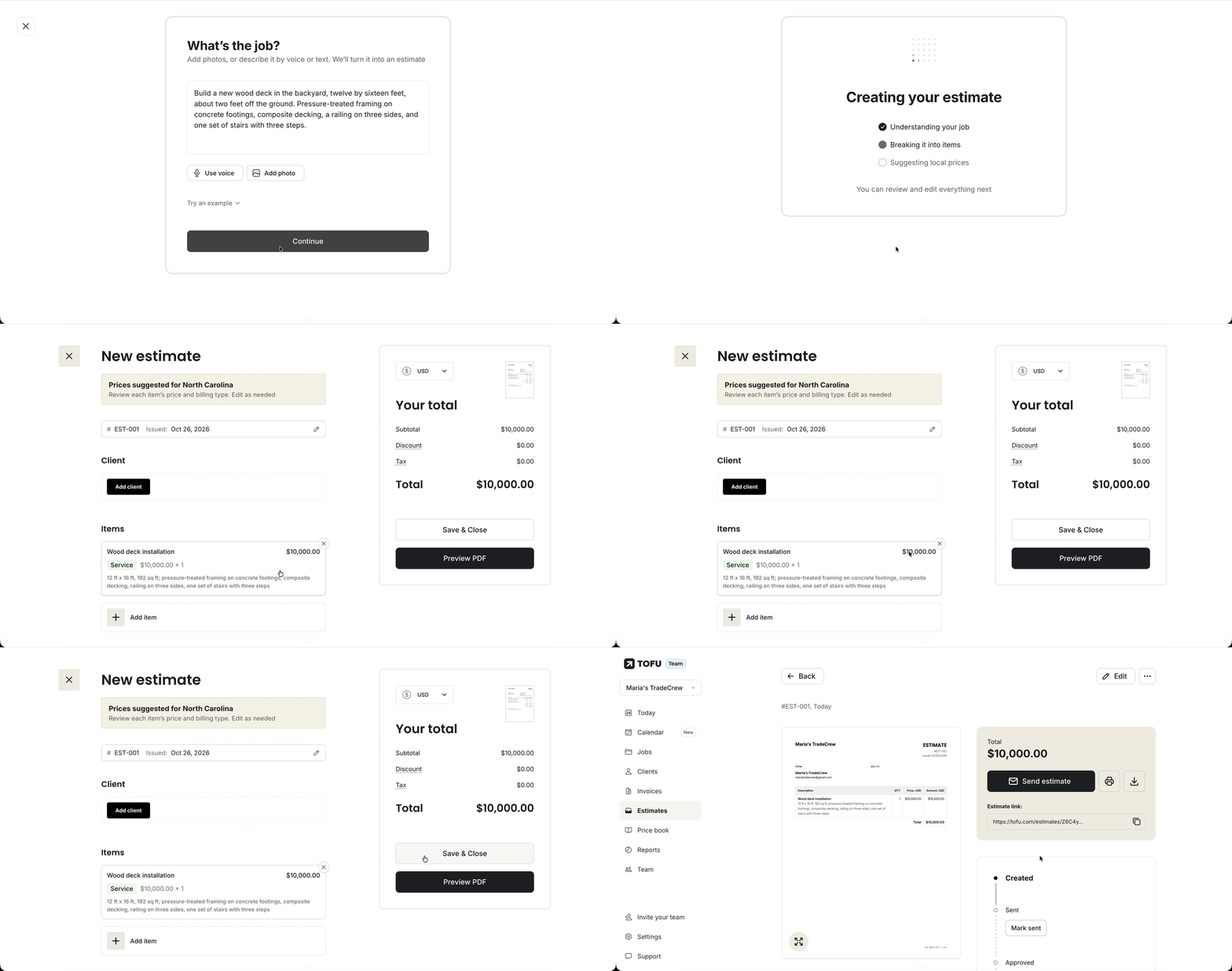
Go to Estimates, tap Create Estimate, then Draft estimate with AI. Describe the work by typing, by voice, or by adding photos – or combine them.

Step 3: Get a draft with line items and prices
Tofu reads the job, breaks it into items, and suggests local prices for your state. Each line gets a name, a price, a quantity, and a short note pulled from your description.
Step 4: Review, adjust, send
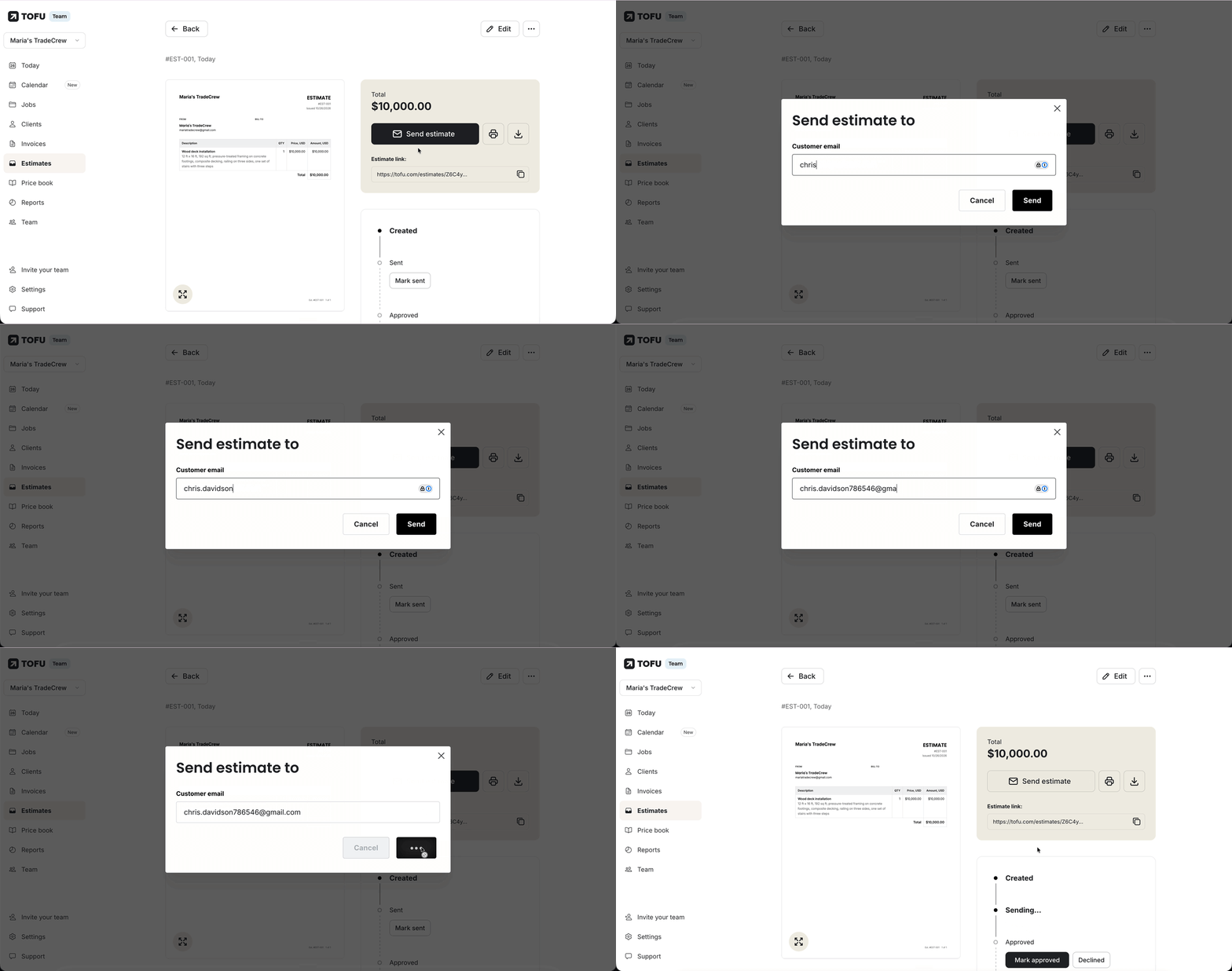
Change any line, quantity, or price, add the client, preview the PDF, and send the estimate by email, text, or link. Once the client approves, it converts to an invoice in one tap.
How fast is it?
In Tofu's production logs, a draft from a job description took a median of 1.8 seconds (272 requests, September 30 – October 22, 2026; 90% within 2.9 seconds). A draft with photos took a median of 3.7 seconds (29 requests, October 15–22; 90% within 5.1 seconds). Voice transcription isn't included and adds a few seconds per minute of recording.
Your next estimate in 5 seconds
Describe the job, add a photo, and get a priced draft for your state.
AI estimate examples: HVAC, general contracting, and remodeling
We ran real jobs through Tofu's AI estimates on the web for a contractor in North Carolina. Below are the first drafts exactly as the AI returned them, before any edits.
HVAC repair, North Carolina: $1,240 in four lines
Job description: “AC not cooling at a single-family home. Outdoor unit runs but the fan won't start. Replace the run capacitor and the contactor, recharge refrigerant, R-410A, about 3 pounds, and swap the old thermostat for a programmable one.”
| Line item | Note on the estimate | Price |
|---|---|---|
| Run capacitor replacement | $250 | |
| Contactor replacement | $240 | |
| Refrigerant recharge | R-410A, 3 lb | $450 |
| Thermostat replacement | Programmable | $300 |
| Total | $1,240 |
Every task in the description became its own line, and the details the client cares about – refrigerant type and weight, thermostat type – landed in the notes, so the client sees what each price covers.
New deck, North Carolina: $15,100 in six lines
Job description: “Build a new wood deck in the backyard, twelve by sixteen feet, about two feet off the ground. Pressure-treated framing on concrete footings, composite decking, a railing on three sides, and one set of stairs with three steps. Break it into separate line items for footings, framing, decking, railing, stairs, and labor.”
| Line item | Note on the estimate | Price |
|---|---|---|
| Concrete footings installation | $1,500 | |
| Pressure-treated framing installation | $2,500 | |
| Composite decking installation | 12 ft x 16 ft | $5,000 |
| Railing installation | Three sides | $1,800 |
| Stairs installation | Three steps | $800 |
| Labor | $3,500 | |
| Total | $15,100 |
Ask for separate lines, and you get them: each part of the deck has its own price, so the client sees where the money goes.
Bathroom remodel, North Carolina: $10,250 in seven lines
Job description: “Bathroom remodel, about 5 by 8 feet. Tear out the old tub and tile. Install a walk-in shower with a glass door, new tile on the floor and shower walls, a new vanity with sink and faucet, and a new toilet. Replace the exhaust fan and add two new light fixtures. Break it into separate line items for demolition, shower, tile, vanity, toilet, and electrical.”
| Line item | Note on the estimate | Price |
|---|---|---|
| Demolition | Tear out old tub and tile | $700 |
| Walk-in shower installation | With glass door | $5,000 |
| Tile installation | Floor and shower walls | $2,500 |
| Vanity installation | With sink and faucet | $900 |
| Toilet replacement | $400 | |
| Exhaust fan replacement | $450 | |
| Light fixture installation | $300 | |
| Total | $10,250 |
Every part of the remodel became its own line, with the details in the notes, so it's easy to answer when the client asks what the tile alone costs.
Are AI estimates accurate?
AI estimates are accurate enough to start from, but check them before you send. On October 21, 2026, we tested 50 line items from real Tofu estimates. We compared the AI's price with the market price range for the contractor's state from HomeAdvisor, HomeGuide, Fixr, and Angi. In 73% of cases, the AI's price was inside that range. Half of the AI's prices were within about 38% of the typical market price.
That's better than Tofu's old price list, which suggested prices from past invoices. Tested the same way on 30 line items, it landed inside the market range 60% of the time, and half of its prices were within 46% of the typical market price.
Keep two things in mind:
- Price guides aren't exact either. They show wide national ranges and mix big and small jobs. Both the AI and our old price list came in about a third lower than the guides on average, partly because the guides lean toward bigger jobs.
- A better description gets a better price. “Fix bathroom” tells the AI almost nothing. “Replace 40-gallon gas water heater, haul away old unit, second-floor closet” tells it the size, the fuel, the disposal, and the access. From October 15 to 25, 2026, 95% of AI requests came back with priced line items; for the rest, Tofu either hit an error or asked for a more detailed description.
What AI does well – and what to check
| Usually solid | Check every time |
|---|---|
| Turning each task in your description into its own line | Your own labor rate and minimum charge |
| Putting details like size, type, and quantity in the line notes | Access: attics, crawlspaces, upper floors |
| Splitting a big job into separate lines when you ask for it | Brand, model, or grade the client asked for |
| A starting price in the right range for your state | Extra lines like permits, haul-away, or a trip charge – add them if the job needs them |
| Line names a client can read without explanation | Anything you saw on site that isn't in the description or photo |
A 60-second check before you hit send
- Read every line out loud as if the client were standing next to you. Anything you'd have to explain – rename it.
- Swap in your own labor rate if it differs from the suggested one.
- Add what only you saw: rot behind the tile, a breaker panel that won't pass inspection, a dog in the yard.
- Check quantities against the photo.
- Look at the total and ask: would I take this job at this price?
Send the estimate while you’re still on site
Review the draft, adjust any line, and send it before you leave the site.
What kinds of AI estimating software are there?
Every AI estimating tool does the first draft for you. It reads the job, splits it into line items, and suggests a price for each one. You still make the final call – the AI writes the draft, you approve it.
There are three kinds of tools, and they do different jobs:
| Type | What you give it | Who it's for | Examples |
|---|---|---|---|
| AI takeoff | Blueprints and PDF plans | Estimators who bid commercial or new-build projects | Togal.AI, Handoff (AI Takeoff) |
| On-site AI estimates | A short job description (typed or spoken) and photos | Service and remodeling contractors who price jobs at the client's home | Tofu, QuoteIQ, Handoff |
| Chatbots | Anything you type into a chat | One-off drafts, if you check every number yourself | ChatGPT, Claude, Gemini |
If you work from plans, start with a takeoff tool. If you walk into a basement, look at a furnace, and need a price before you leave, you need the second kind.
Can ChatGPT do construction estimates?
Yes, ChatGPT can draft an estimate, but the rest is on you. Give it the job, the location, and the scope, and it will list line items with rough prices. Here's what it won't do on its own:
- Remember your state, labor rate, and prices from one job to the next.
- Make a branded estimate the client can open, approve, and pay.
- Turn an approved estimate into an invoice or remind you to follow up.
- Save the estimate with the client, the job, and the job photos.
For an occasional estimate, a chatbot plus a job estimate template is enough. If you send several estimates a week, it's faster to use an app that drafts the estimate where you already schedule jobs, send invoices, and get paid – no copy-paste.
Which AI estimating tool fits your jobs?
Pick a tool based on how you price work, not on the longest feature list. All the tools below draft estimates with AI, but they work from different inputs and do different things with the draft.
| Tool | What the AI works from | Best for | What happens after the draft |
|---|---|---|---|
| Tofu | A job description (typed or spoken) and photos; prices for your state | Service and remodeling contractors with crews up to 25 who price jobs on site | The estimate is saved with the client and the job and turns into an invoice in one tap. Scheduling, payments, and proof of visit are in the same app. |
| QuoteIQ | Text or voice, up to five photos, then five follow-up questions from the AI | Home-service contractors in 50+ trades | Opens in QuoteIQ's estimate editor with a confidence score for each line; each estimate uses 5–15 IQ Credits from your monthly plan. |
| Handoff | A scope of work, blueprints, or job photos | Home builders and remodelers | Becomes a proposal in Handoff's CRM and client portal. |
| Beam (trybeam.com) | Plans, takeoffs, spreadsheets, or written notes | Construction and remodeling teams that bid projects | Turns into a project budget and invoices; the free plan includes five AI-assisted estimates. |
| Togal.AI | Blueprints and plan sets | Commercial estimators doing takeoff | Measures quantities you then use in your estimate. |
| Jobber | New client requests | Home-service businesses already using Jobber | Drafts a quote from a new request for you to review. |
| ChatGPT and other chatbots | Whatever you type in | Occasional, one-off drafts | You copy the result into your own template; nothing is saved with the client or job. |
One more difference: some tools ask questions before they draft (QuoteIQ asks five), others draft right away and let you fix the result. Questions first can make the first draft closer. Drafting first is faster when you already know the job and just need the lines written. AI features are often limited by plan or by credits, so check each tool's pricing page.
One app from estimate to paid
Estimates, scheduling, invoices, and payments in one app for crews up to 25.




